





Open source (and self-hosted) session replay tools


Contents
Open-source analytics is great when you need hard numbers, but hard numbers don't give you the full picture.
What else do you need to do? Talk to users? Sure. Gather feedback? That's useful, too. But, for us, there's nothing better than watching session replays for understanding a user's pain points.
Replays (aka session recordings) are a great way to understand:
- What causes bugs and user frustration.
- Where users are getting stuck on your site.
- Hesitation at different stages of your funnel.
- How your users are interacting with individual elements of your product.
Hotjar (now part of Contentsquare) and Fullstory are popular session replay products, but they're expensive, inflexible, and primarily designed with marketing teams.
In this guide, we're looking at Hotjar alternatives that are either free or open source, particularly session replay tools.
1. PostHog
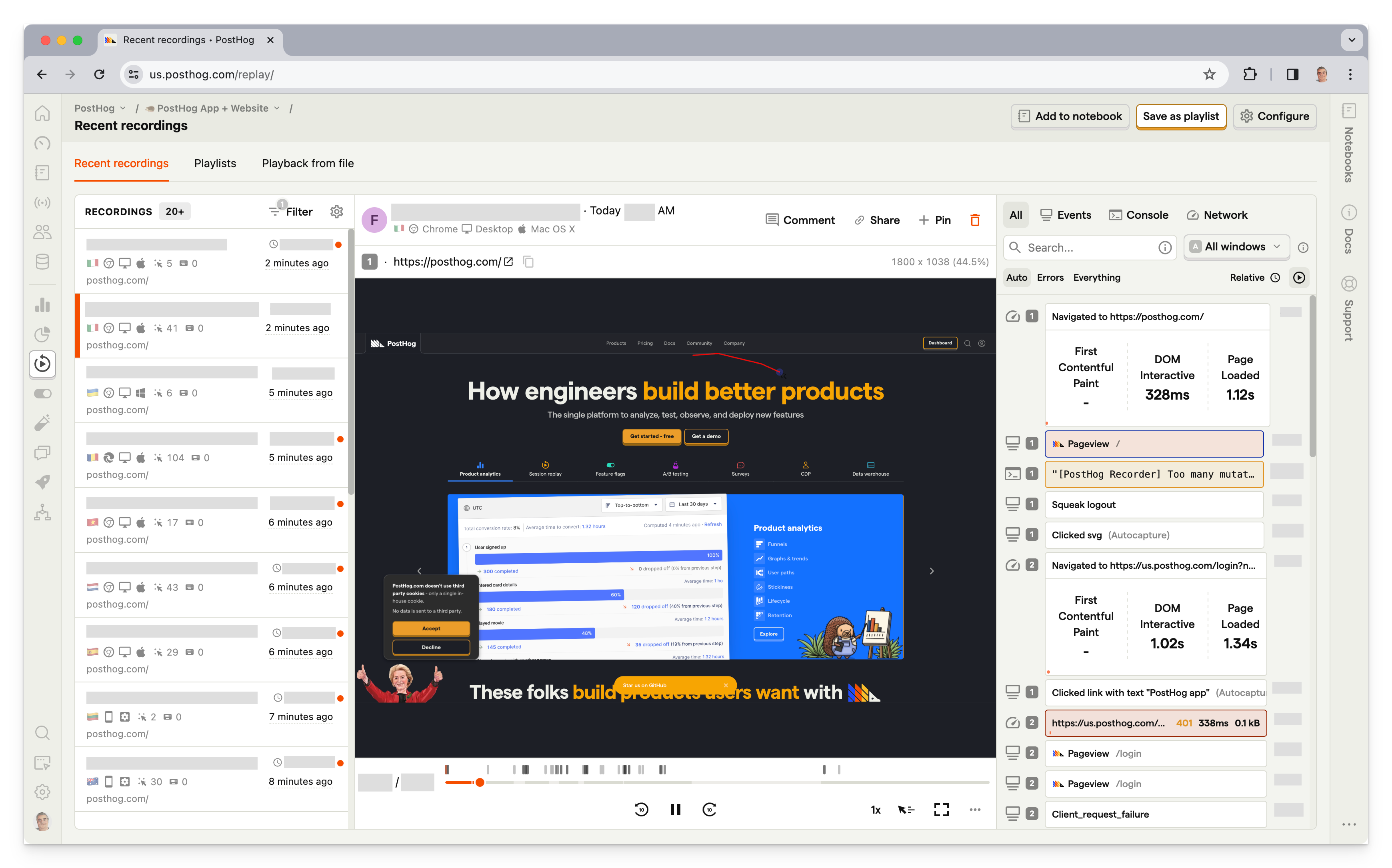
PostHog (that's us 👋) is an all-in-one developer platform that includes session replay, product analytics, heatmaps, feature flags, A/B testing, error tracking, surveys, and more.
This means it's not just an open source session replay tool, but a full replacement for tools like Hotjar, FullStory, LaunchDarkly, and Sentry.
PostHog's session replay includes console logs, network activity, a DOM explorer, and performance metrics so you can identify the root cause of bugs without leaving the replay. You can filter recordings by user, event, feature flag, or any combination of properties, save playlists of related sessions, and export recordings offline for safe keeping.
AI session summaries automatically surface key moments and issues, so you don't have to watch every recording in full. All of PostHog's tools work together natively – jump from a funnel drop-off directly into a relevant replay, or see which feature flag a user was on when they hit a bug.
Who is PostHog for?
PostHog is ideal for startups, product-minded developers, and product teams. Unlike Hotjar and Fullstory, it's designed for technical users. Its broad range of features means PostHog can replace several tools.
It also supports replay for mobile apps running that use Android, iOS, React Native, and Flutter SDKs, making it a good option if you're also looking for a tool that offers Hotjar features for mobile apps.
Key features
- Session replay: Console logs, network activity, DOM explorer, and performance metrics. Filter recordings by user, event, or feature flag. Export recordings offline. AI session summaries automatically surface key moments and issues without watching every recording.
- Mobile replay: Native SDKs for iOS, Android, React Native, and Flutter with 2,500 free mobile recordings per month.
- Heatmaps: Visualize clicks (including rage clicks), scroll depth, and mouse movement.
- Error tracking: Monitor exceptions and stack traces connected directly to session replays.
- Product analytics: Funnels, user paths, retention, trends, and SQL access for custom queries.
- Privacy controls: CSS selectors to block sensitive data. Cookieless tracking available.
How much does PostHog cost?
PostHog is free up to 1 million captured events, 5,000 web and 2,500 mobile recordings per month, and you can set billing limits to avoid surprise bills.
Bottom line
PostHog is the best open source session replay tool if you want more than just replay. Its generous free tier, mobile support, and tight integration with analytics, feature flags, and error tracking make it the most complete option on this list.


Install PostHog with one command
Paste this into your terminal and make AI do all the work.

2. OpenReplay
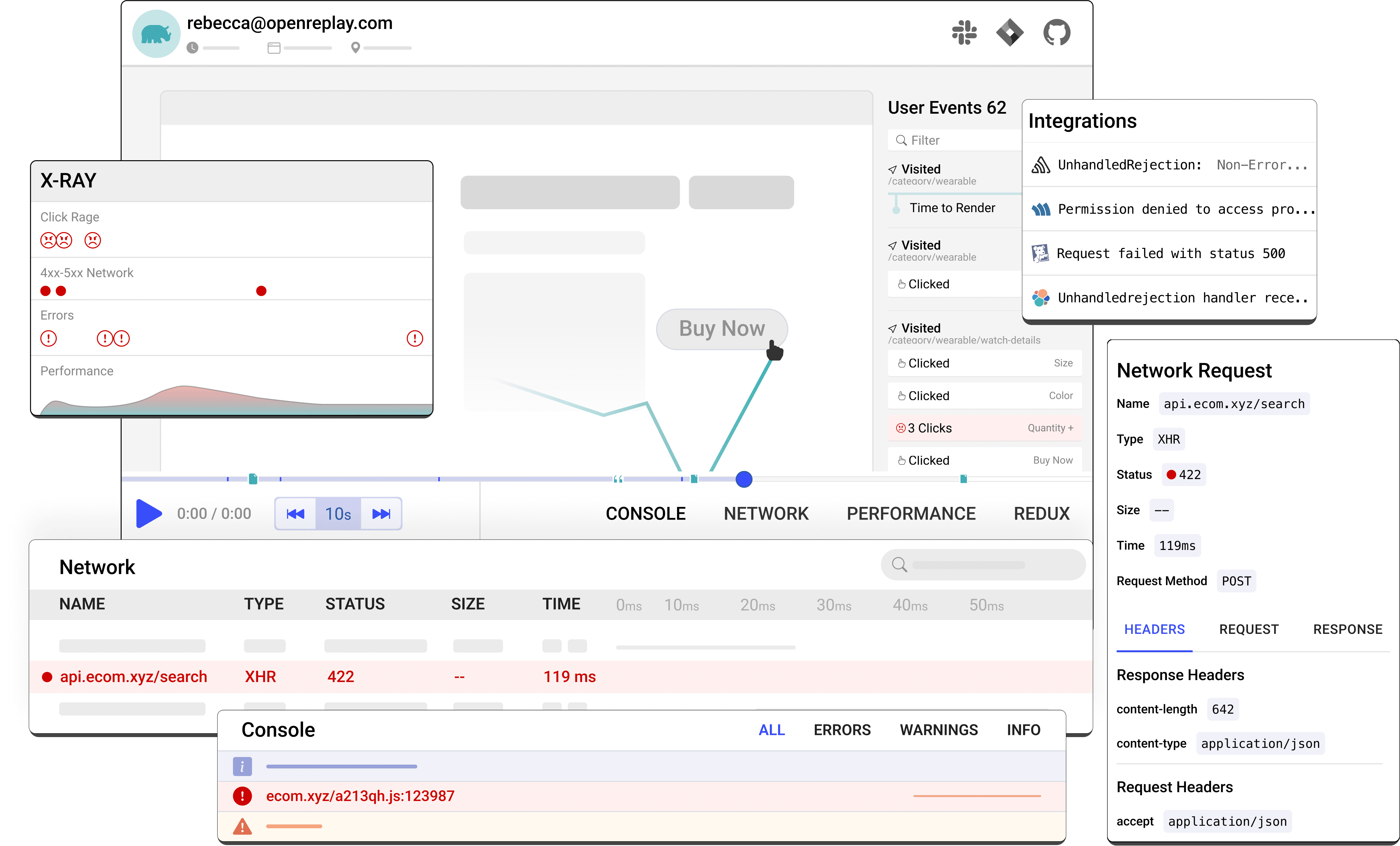
OpenReplay is an open-source alternative to Microsoft Clarity that offers more advanced, technical features for engineers on top of basic session replay. Its tooling is particularly effective for application state and customer support. It has some basic analytics features, such as funnel analysis, though it falls some way short of feature-complete product analytics tools.
Who is OpenReplay for?
OpenReplay is a developer-friendly tool. It allows engineers to see how users are interacting with their web apps, respond to issues faster, and troubleshoot problems with users.
Key features
- Session replay: Pixel-perfect recordings with event timelines, network activity, console logs, and JS error capture.
- DevTools: Reproduce bugs as if they happened in your own browser, with application state, GraphQL queries, and 40+ metrics.
- Co-browsing: Live screen sharing with users via WebRTC – no third-party software required.
- Heatmaps: Click and scroll heatmaps added in recent releases.
- Product analytics: Basic funnel analysis and conversion tracking.
- Spot: A Chrome extension for recording bugs directly from the browser with full technical context attached.
How much does OpenReplay cost?
OpenReplay offers three ways to deploy, plus a custom enterprise option:
- The open source edition is free and includes all core features, but you host it on your own infrastructure and manage storage, scaling, and retention yourself.
- Dedicated is a fully managed, single-tenant instance starting at $199/month, billed hourly at $0.276/hour with no limits on users, recordings, or retention. It adds SSO, custom data retention, and data residency across 50 regions.
- Serverless is a usage-based option where you pay only for the sessions you record. It's free up to 1,000 sessions/month, and then $5.95 per 1K sessions/month with unlimited users, projects, and 30-day retention.
Bottom line
OpenReplay is the best self-hosted option for developer teams that need advanced debugging tools and full data sovereignty. Its co-browsing feature is unique among open source tools. The tradeoff is that self-hosting requires real DevOps resources to deploy and maintain at scale.
3. Sentry
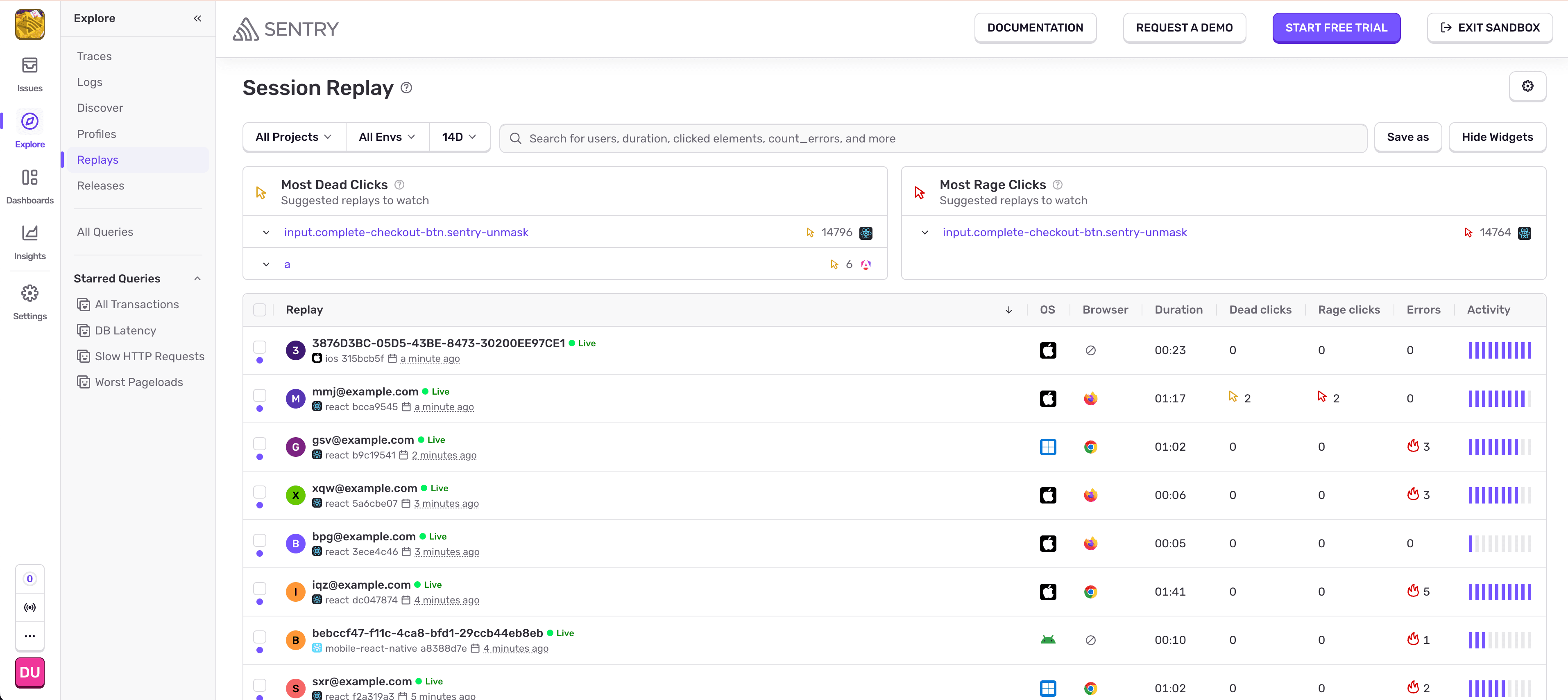
Sentry is a source-available application monitoring platform primarily known for error tracking and performance monitoring.
Session replay was added in 2023 and is tightly integrated with Sentry's error data: when an exception fires, the session replay for the affected user is automatically linked, giving you the full interaction context without any additional investigation.
Who is Sentry for?
Sentry is for developers and engineering teams, not UX or product teams. Sentry approaches replay from an error-first perspective – it's most valuable when you want to understand what a user was doing right before something broke.
Key features
- Session replay: Video-like reproduction of user interactions including page visits, mouse movements, clicks, taps, and scrolls.
- Error-linked replay: Every error automatically links to the relevant session replay for instant context.
- Performance monitoring: Web vitals, transaction tracing, and frontend performance data alongside replays.
- Error tracking: Real-time exception monitoring with stack traces across dozens of languages and frameworks.
- Self-hosting: Full self-hosted deployment available free.
How much does Sentry cost?
Sentry has four plans.
- The Free plan is $0 and includes 1 user, error monitoring, and 50 session replays/month.
- The Team plan is $26/month with unlimited users and 50 replays included, with additional replays available at usage-based rates.
- The Business plan is $80/month and adds unlimited custom dashboards and anomaly detection.
- Enterprise pricing is custom.
All plans include 50 session recordings. Self-hosting is free via Docker Compose, though it's designed for simpler deployments rather than large-scale production use.
Bottom line
Sentry is the best option if your team already uses it for error monitoring and wants to add session replay without a new vendor. It's not a standalone replay tool – it's most valuable when replay is part of a broader error and performance monitoring workflow.
4. UXWizz
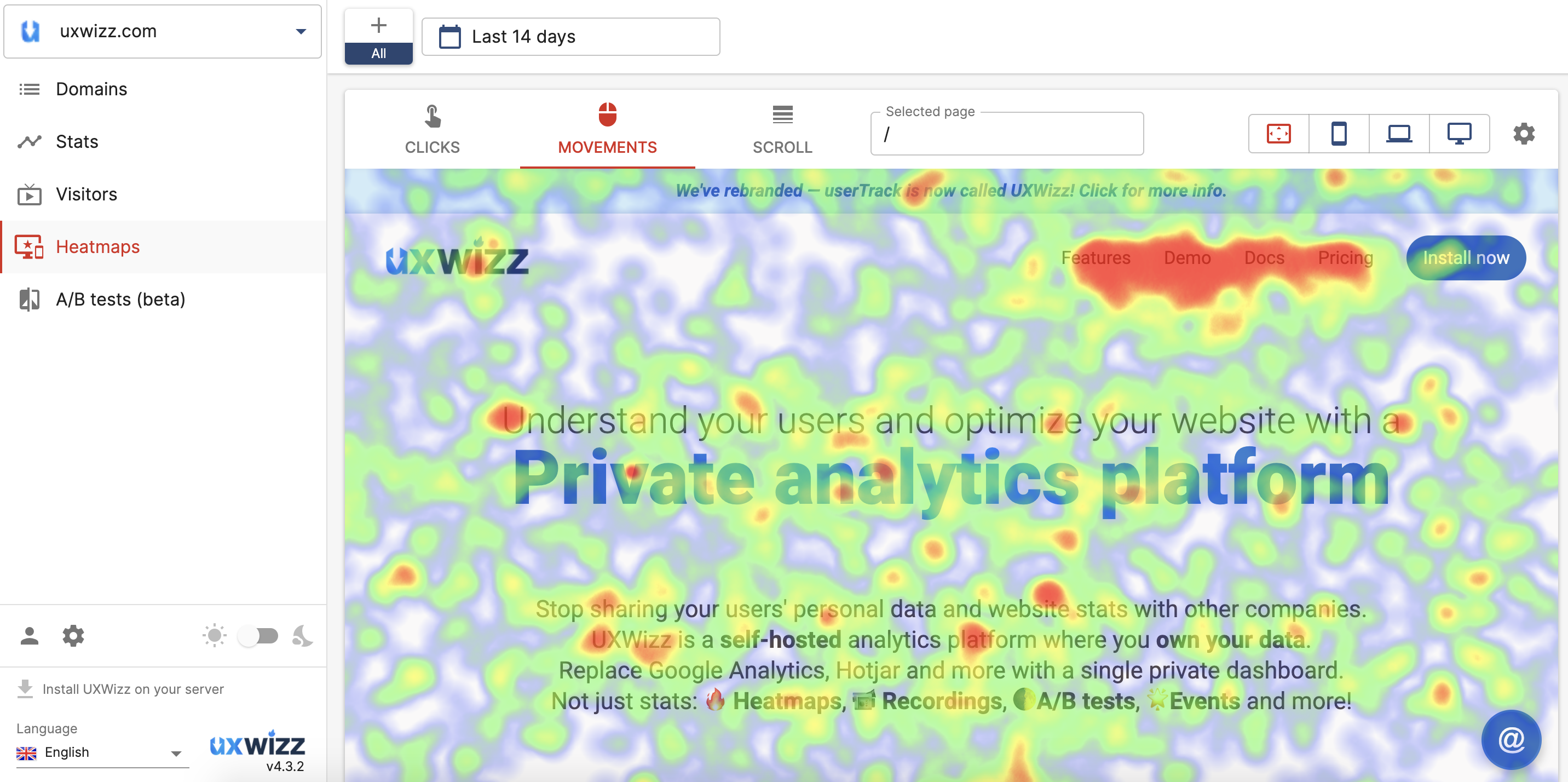
UXWizz is a self-hosted product analytics tool offering visitor insights, session recording, heatmaps, segments, and basic A/B testing.
It offers a lightweight version of session recording that only stores the URL of the page and the user actions. This is designed to optimize your data storage and remove the manual maintenance otherwise required by UXWizz.
Who is UXWizz for?
UXWizz is a good choice for individuals and small businesses who want quick, qualitative insights and session recordings. A Wordpress plugin is also available.
Key features
- Session recording: Lightweight and full DOM recording modes.
- Heatmaps: Click, move, and scroll heatmaps.
- Visitor segmentation: Filter and group visitors by behavior, device, or custom properties.
- A/B testing: Basic split testing built in.
- Error tracking: Monitor and log JavaScript errors.
- AI analysis: Ask AI to generate stats and charts using natural language queries.
- WordPress plugin: Easy installation for WordPress sites.
How much does UXWizz cost?
UXWizz is self-hosted only with a one-time license fee.
- The Personal license is $299 and covers unlimited websites, visitors, recordings, and heatmaps for a single user.
- The Company license is $799 and adds unlimited dashboard users for teams. Both include one year of free support and updates, with extensions available as paid add-ons.
- The Agency license is $2,490 and includes white-labeling, custom branding, custom dashboard pages, domain limits per user, and up to 5 servers – intended for agencies managing analytics on behalf of clients.
All tiers include one year of free support and updates, with extensions available as paid add-ons. There is no cloud version and no free tier, though a free trial is available.
Bottom line
UXWizz is a good fit for individuals and small businesses who want basic self-hosted analytics and session recording without a monthly bill. The single-developer maintenance model is a real risk for long-term reliability, but the one-time pricing makes it a low-stakes option to try.
5. UXlens
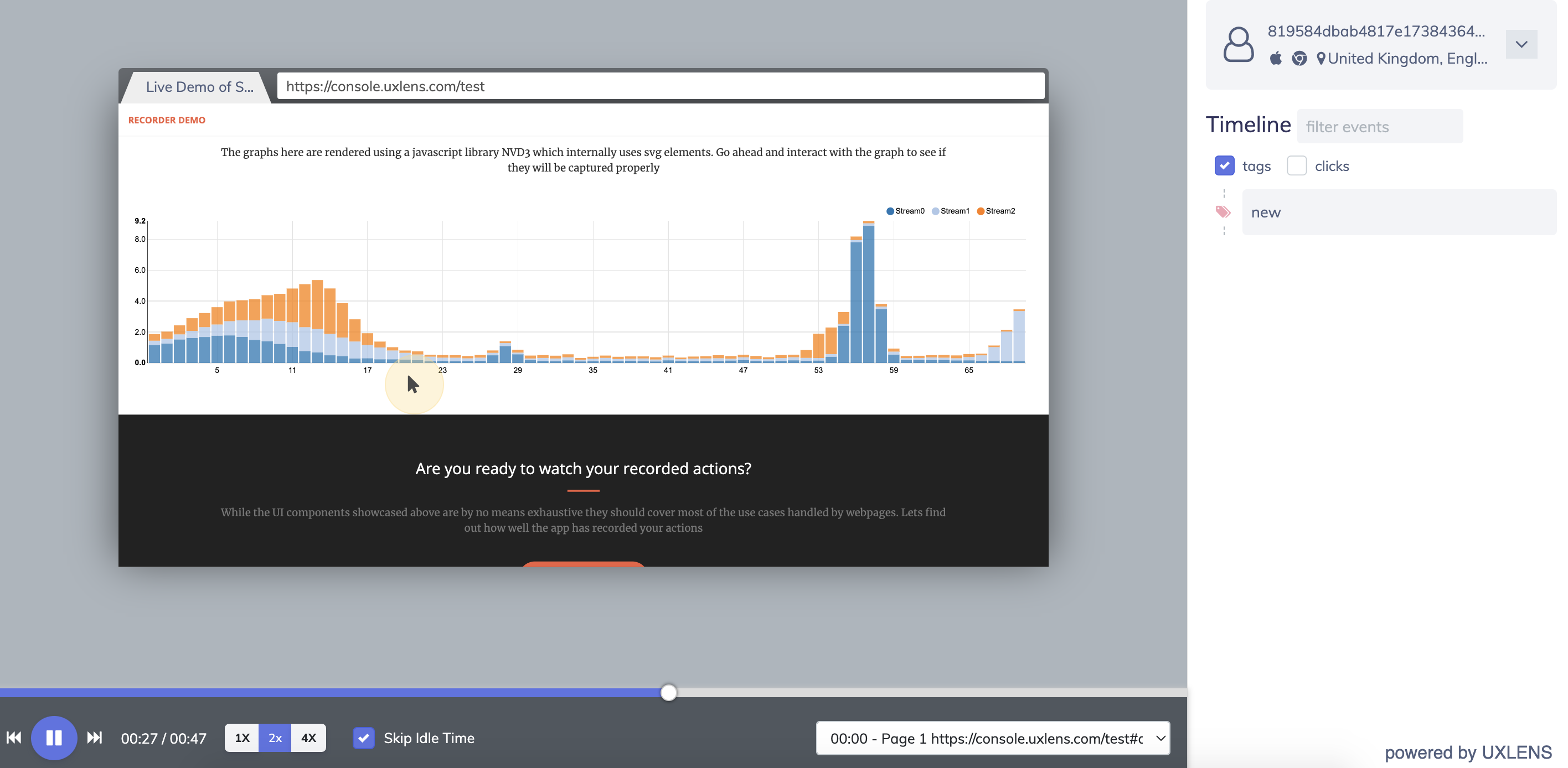
UXlens is a developer-first session recording tool that provides insight into user interface and conversion issues. It does not include any additional analytics tools, but does have useful segment filtering features that help businesses locate blocks in their funnel.
Who is UXlens for?
UXlens is a good choice for UX designers and product teams who want to study the impact of their UI on the user journey without spending too much.
Key features
- Session recording: Lightweight recordings focused on user interactions.
- Segment filtering: Customizable filters to track sessions by user segment, device, or page.
- Privacy by default: Input elements masked by default to protect user data.
- Self-hosting: Docker-based self-hosted deployment available.
How much does UXlens cost?
UXlens offers both cloud subscriptions and self-hosted lifetime licenses. Cloud plans start at $6/month (Starter, 6,000 recordings) and go up to $70/month (Business Plus, 80,000 recordings), with Professional at $12/month (12k) and Business at $30/month (32k).
All cloud plans include a 30-day recording history and conversion funnels. Enterprise plans are available on request.
Self-hosted lifetime licenses start at $200 one-time (Startup – up to 3 websites, 10 admin seats) and $500 one-time (Agency – unlimited websites, 10 admin seats). An Agency Plus tier with REST API access is available on a yearly basis (contact for pricing), and a free license is available for non-commercial and personal use.
Bottom line
UXlens is a minimal, affordable session recording tool for small teams who just need the basics. It lacks the depth of analytics and developer tools found in PostHog, OpenReplay, or Sentry, but its low price point and self-hosting option make it worth considering for simple use cases.
6. Matomo
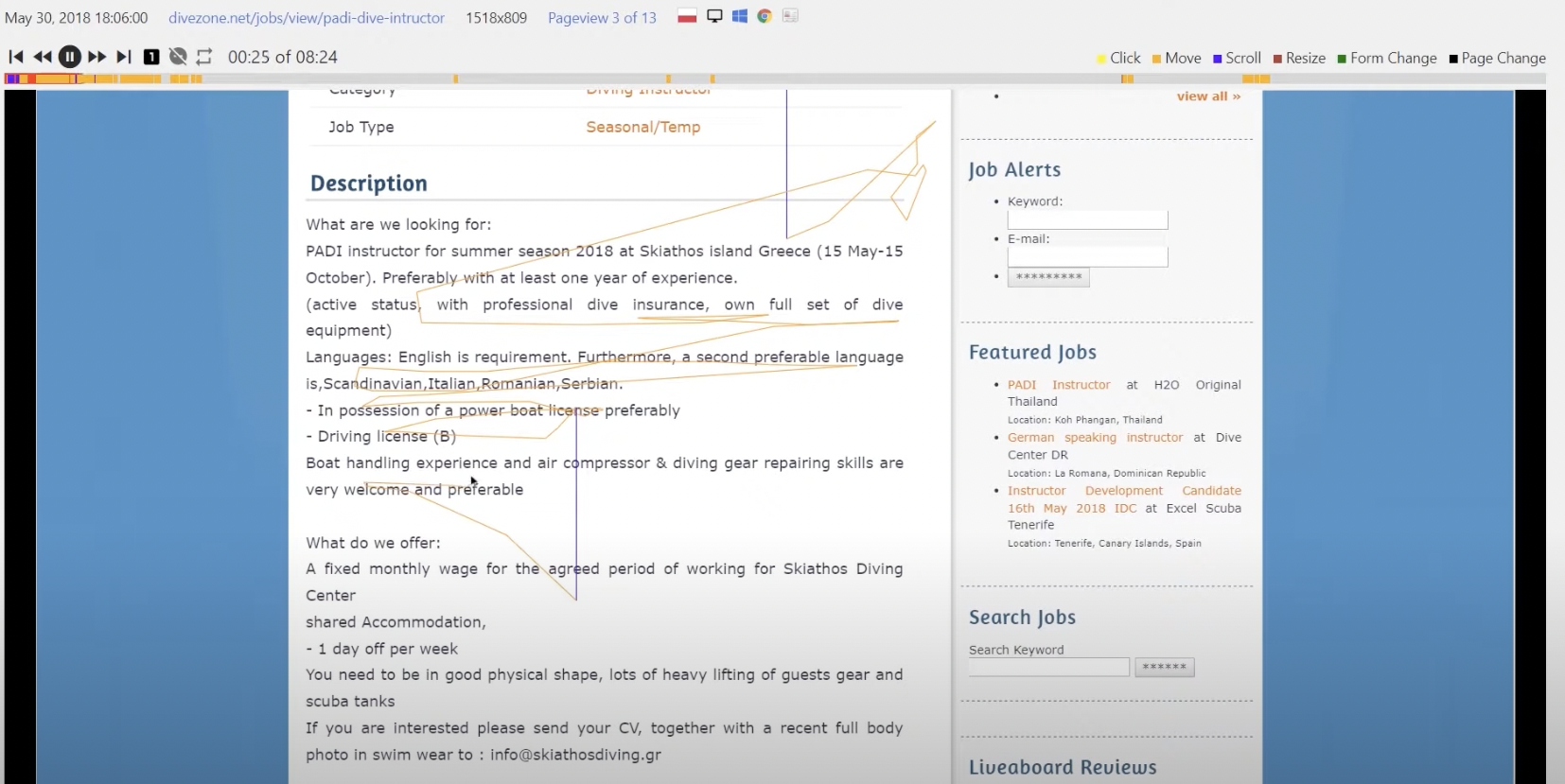
Matomo is an open web analytics platform. Touted as an alternative to Google Analytics, Matomo is largely focused on understanding marketing website analytics. Session recording is available as an add-on via the on-premise marketplace.
Who is Matomo for?
Matomo is mainly built with marketing and content teams in mind, offering insights into website content engagement for optimization of user journeys. Features like session recording are part of a wider set of tools that are useful for product teams as well, but they aren't included in Matomo's open source release.
To learn more, read our PostHog vs Matomo comparison.
Key features
- Web analytics: Traffic, referrers, goals, funnels, and acquisition analysis.
- Session recording: Available as a paid add-on for self-hosted; included in cloud Business plan.
- Heatmaps: Click and scroll heatmaps, also a paid add-on for self-hosted.
- GDPR compliance: Built-in consent management and EU data hosting options.
- Self-hosting: Full on-premise deployment with no data sent to third parties.
How much does Matomo cost?
Matomo On-Premise is free and open source – the core analytics platform costs nothing to self-host, with optional paid plugins available separately.
Matomo Cloud is priced by monthly hit volume: starting at $26/month for 50,000 hits, $42/month for 100,000 hits, $85/month for 300,000 hits, and scaling up to $399/month for 2 million hits and beyond.
All cloud plans include 150 session recordings and 1,500 heatmap pageviews per month, but it's unclear how this scales. Enterprise plans for very high volumes are available on request.
Bottom line
Matomo is the best option on this list if you primarily want website analytics and want session recording as a secondary add-on. The session recording feature is not included in the free open source release, which limits its appeal compared to tools where replay is a core feature.
Which open source session replay tool should you choose?
- Want an all-in-one platform with session replay, product analytics, feature flags, error tracking, and more? Go with PostHog.
- Need a powerful self-hosted option with advanced DevTools, co-browsing, and strict data residency requirements? Choose OpenReplay.
- Already using Sentry for error monitoring and want replay without adding another vendor? Stick with Sentry.
- Want basic self-hosted recording and heatmaps with no monthly fees? UXWizz or UXlens are your best bets.
- Need open source web analytics with session recording as part of the package? Try Matomo.
Is PostHog right for you?
Here's the (short) sales pitch.
We're biased, obviously, but we think PostHog is the best open source session replay tool if:
- You want session replay tightly connected to product analytics, feature flags, and error tracking.
- You need mobile replay (iOS, Android, React Native, Flutter) on all plans including free.
- You want transparent, usage-based pricing with a generous free tier and no sales calls.
- You want open source code you can audit, self-host, or contribute to.
It's completely free to get started – no credit card required. Our AI setup wizard handles configuration in minutes, or check out our docs to do it yourself.
Install PostHog with one command
Paste this into your terminal and make AI do all the work.
Frequently asked questions
PostHog says it makes your product "self-driving" – what does that mean?
It means PostHog digs through your product data, finds what's worth fixing, and has agents do the work.
It starts with context. A full suite of developer tools – AI Observability, Product Analytics, Session Replay, Feature Flags, Experiments, Error Tracking, Logs, and more – captures everything happening in your product, and a Context Warehouse unifies it into one source agents can read across.
From there, Scouts read across all of it and sort what's worth knowing from what's just noise. What clears the bar becomes a report in your inbox: an agent picks it up, roots out the cause, and opens a PR. You review and merge.
You can steer it from Slack, the web app, the desktop app, or your own editor via the MCP or CLI.
What is open source session replay?
Open source session replay tools record how users interact with your website or app – clicks, scrolls, mouse movements, and form interactions – and let you replay those sessions to understand user behavior.
Unlike proprietary tools like Hotjar or FullStory, open source tools give you access to the source code, the ability to self-host, and full control over your data. This matters for teams with strict privacy requirements, data residency needs, or who simply want to avoid vendor lock-in.
What's the difference between open source and self-hosted session replay?
Open source means the source code is publicly available and you can audit, modify, or contribute to it.
Self-hosted means you run the tool on your own infrastructure rather than using a vendor's cloud.
Most open source session replay tools can be self-hosted, but not all self-hosted tools are open source. For example, Sentry uses a Business Source License (source-available, not fully open source) but can still be self-hosted for free.
Which open source session replay tool has the best free tier?
PostHog has the most generous free cloud tier: 5,000 web and 2,500 mobile session replays, and 1 million analytics events per month.
OpenReplay and Sentry offer free self-hosted versions with no usage limits if you're willing to manage your own infrastructure.
Which tools support mobile session replay?
PostHog is the strongest option for mobile, supporting iOS, Android, React Native, and Flutter with 2,500 free mobile recordings per month included on all plans. OpenReplay has added mobile support in recent releases (iOS and Android). Sentry supports session replay for mobile apps. Most other tools on this list are web-only.
Is Highlight.io still available?
Highlight.io was acquired by LaunchDarkly in March 2025. Existing accounts are being migrated to LaunchDarkly's observability platform; it is no longer recommended as a standalone tool for new deployments.
What happened to Hotjar?
Hotjar merged into Contentsquare. New customers sign up through Contentsquare, and existing Hotjar customers are being migrated to the Contentsquare platform.
The core Hotjar tools (session replay, heatmaps, surveys) still exist within Contentsquare's offering. See our guide to Hotjar alternatives for more.
What are the best session replay tools overall (not just open source)?
The top session replay tools in 2026 include:
- PostHog – Best all-in-one for engineering teams with analytics, feature flags, and error tracking
- Microsoft Clarity – Best completely free option with unlimited recordings
- Smartlook – Best for mobile-first apps with crash reports
- LogRocket – Best for frontend debugging with performance monitoring
- FullStory – Best for frustration signal detection and UX analytics
See our full guide to the best session replay tools for more options.

Subscribe to our newsletter
build mode
Read by 75,000+ founders and builders
We'll share your email with Substack
PostHog is your product's context layer. With a full suite of developer tools – AI observability, product analytics, session replay, feature flags, experiments, error tracking, logs, and more – PostHog ingests and stores all the data agents need to diagnose problems, uncover opportunities, and ship fixes. A data warehouse and CDP tie it all together, unifying that context into one source agents can read across. You can steer it all from Slack, the web app, the desktop (PostHog Desktop), or your own editor via the MCP.